I have lost my smartphone, what can I do?
If your smartphone is unavailable, you must suspend your two-factor authentication to log in. After doing this, you will need to set up two-factor authentication on a new device or browser plugin.
The procedure is as follows:
- Go to the website: https://unibs.2fa.cineca.it/reset-enrollment
- Enter your credentials.
- In this specific case, you will not be asked for the TOTP code.
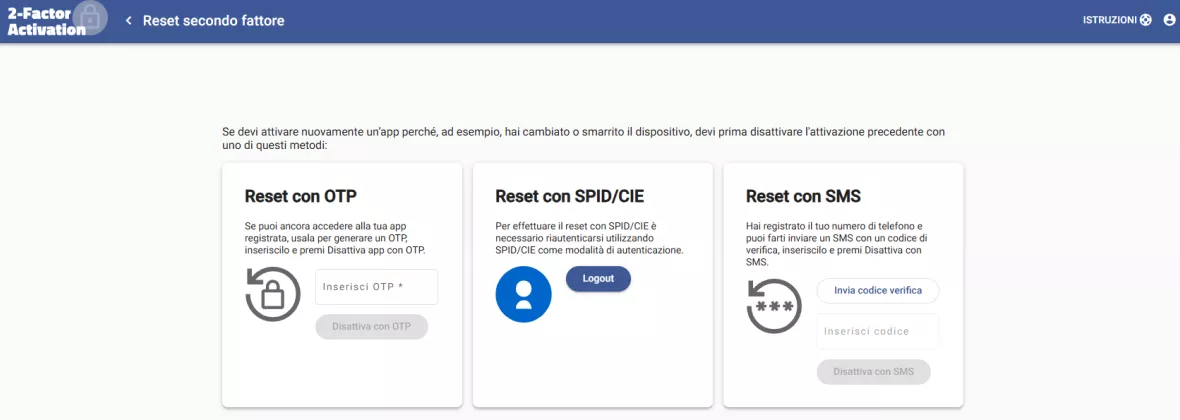
Since your smartphone is unavailable, you can disable the TOTP in two ways:
- Using SPID / CIE
- Reset via SMS
If you choose to use SPID/CIE: You must log in again using SPID or CIE as your authentication method. Once logged in, repeat the procedure by accessing the website mentioned above.
If you choose to use SMS: Click the "Invia codice verifica" (Send verification code) button, and then click "Disattiva con SMS" (Disable via SMS).
Staff and students of the University of Brescia can open a request on the Service Desk support system. Please select: APRI UN TICKET (Open a ticket) > Identità digitale (Digital identity) > Autenticazione a 2 fattori (2-factor authentication).